
Every order lands on the right bill.
Build your restaurant and bar menus, send tickets to the kitchen, mark items complimentary and close every table to a room, a folio or a guest account. One POS for tables, the bar, pick-ups and room service.

What Restaurant and bar changes.
Typical results across properties on DigiStay. Every property is different.
Everything a hotel POS should do.
Restaurant and bar, step by step.
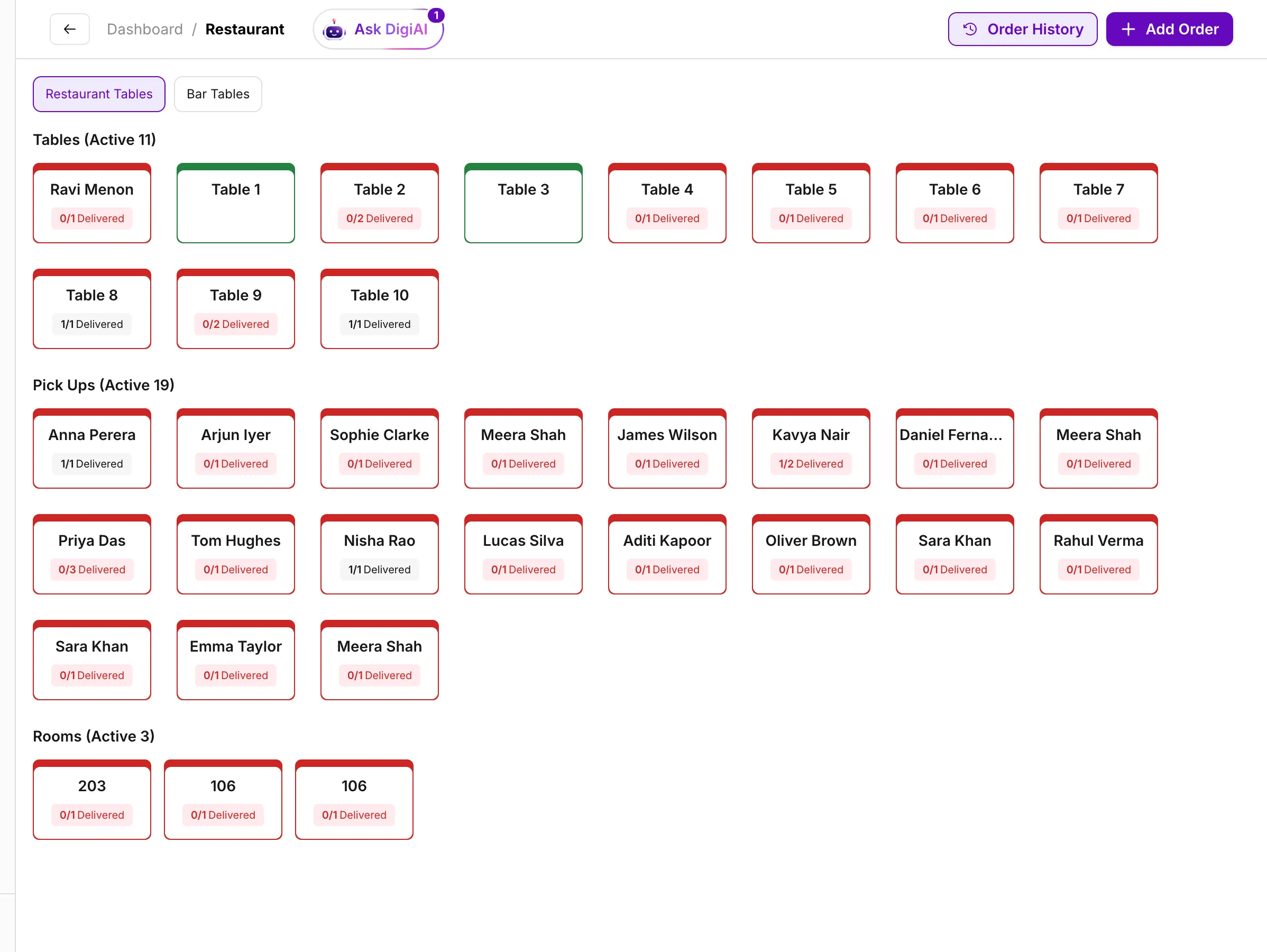
Tables, pick-ups and room service on one screen
Every table, pick-up and room-service order in one view. Occupied tables show what is still to be delivered, free tables show green, and new orders appear the moment they are placed.
- Restaurant and bar tables
- Pick-ups and room service
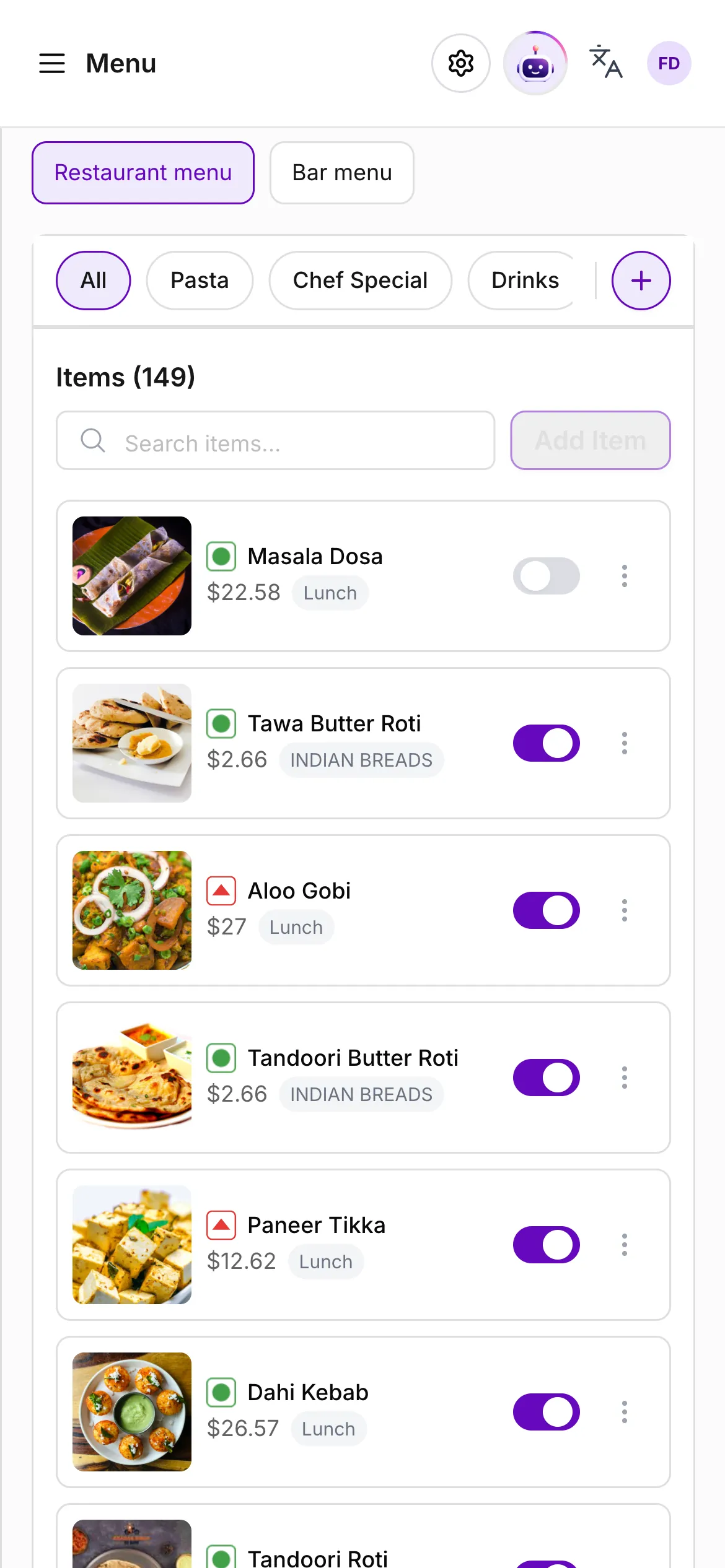
Menus your way
Build a restaurant menu and a bar menu with their own categories. Put categories and items in the order you want, switch an item off when it runs out, and choose what shows in the guest app.
- Restaurant and bar menus
- Switch items on and off
Kitchen tickets with cooking notes
The moment an order is placed, its KOT prints in the kitchen by itself, with the cooking notes. Reprint any ticket in one tap, turn the kitchen on or off, and mark orders delivered as they leave.
- KOT prints automatically on every order
- Cooking notes on every ticket
Complimentary in one tap
On the house? Mark one item or the whole order complimentary. It shows at zero on the bill and everything else stays priced as normal.
- One item or the whole order
- Shown on the bill at zero
Move items and tables
Guests change tables or split up? Move items from one table to another, or move the whole table, without starting the order again.
- Move items between tables
- Move a whole table
To the room, a folio or a guest account
Post the bill to the guest’s check-in and it is settled with the stay, or move it to a company or individual folio. Every stay has a guest account where its charges and payments sit together.
- Post to check-in in one tap
- Company and individual folios
Settle any way
Close a table with UPI, card, cash or bank transfer, or show a payment QR. Add a charge or a discount first, and take part now and the rest later.
- UPI, card, cash or transfer
- Partial payments recorded
Bar menus and happy hours
Keep a separate bar menu with its own timing, tax and invoice settings. Schedule promotions for set dates or the same days every week, for one drink, a category or the whole bar.
- Bar timing, tax and invoice
- Promotions by day and time
The right restaurant tax rate
In India, a hotel restaurant is charged GST at 5% or 18% depending on the hotel’s room tariffs. DigiStay works out the rate for the year and applies it to every food bill.
- 5% or 18%, decided for the year
- On every food bill
More than one restaurant
Run a restaurant, a rooftop bar and a café from the same property, each with its own name and table numbers.
- Each outlet with its own tables
- One view across outlets
Pairs well with Restaurant and bar.
Questions about Restaurant and bar.
Can a restaurant bill go to the guest’s room?
Yes. Post the table’s bill to the guest’s check-in in one tap, and it is settled with the rest of the stay. You can also move it to a company or individual folio.
Can we give something on the house?
Yes. Mark one item or the whole order complimentary. It shows at zero on the bill, and everything else stays priced as normal.
Does the kitchen get a ticket?
Yes. The KOT prints in the kitchen automatically as soon as an order is placed, with its cooking notes. You can reprint it in one tap.
Can we run more than one restaurant or bar?
Yes. Add each outlet with its own name and table numbers, and see them all in one view.
Can we run happy hours?
Yes. Schedule bar promotions for set dates or the same days every week, for a drink, a category or the whole bar.
See restaurant and bar on your own property.
A short call, with your own rooms and rates.