
Every booking site, in step.
Rates, rooms and restrictions go from one calendar to every booking site, and their bookings land straight in reservations. Change a price once and every site has it.

What Channel manager changes.
Typical results across properties on DigiStay. Every property is different.
Channel manager, step by step.
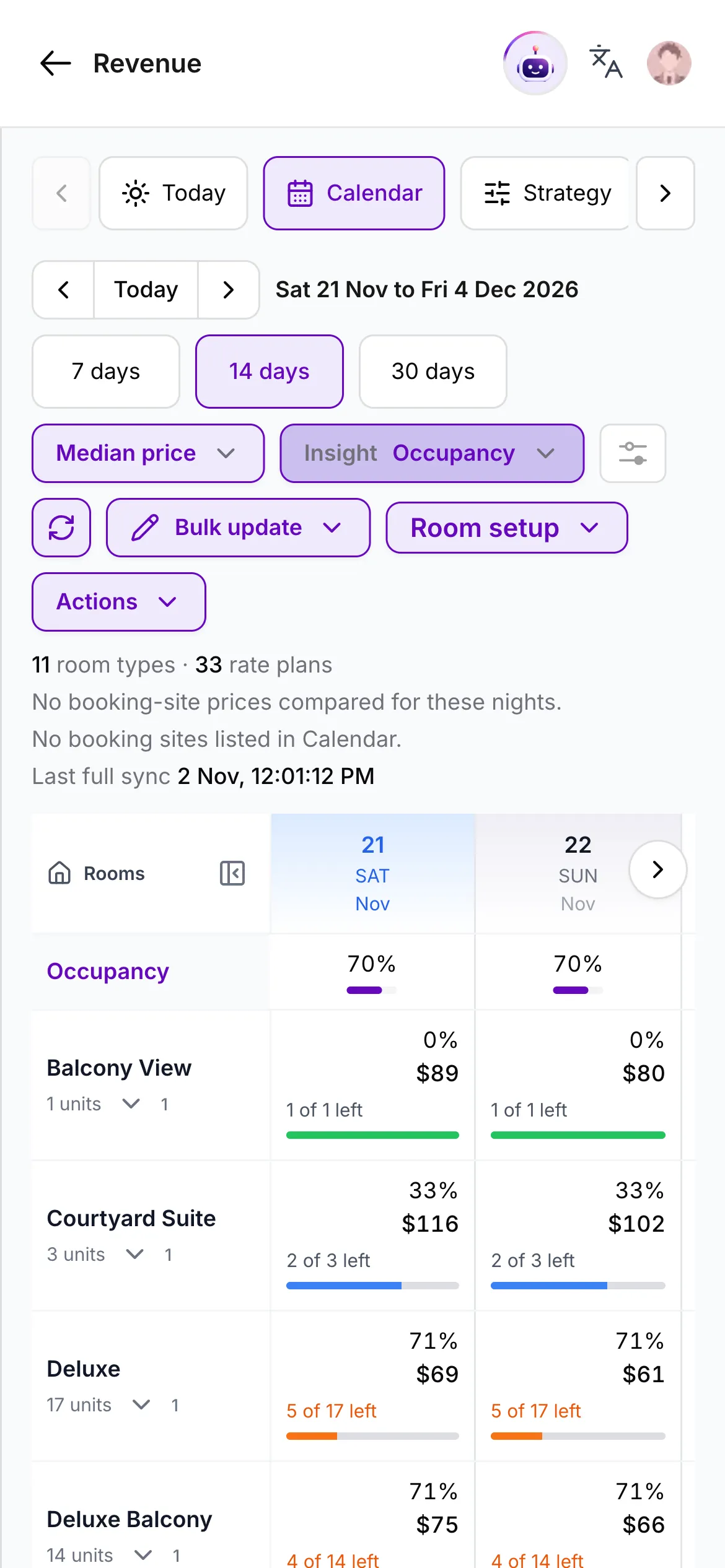
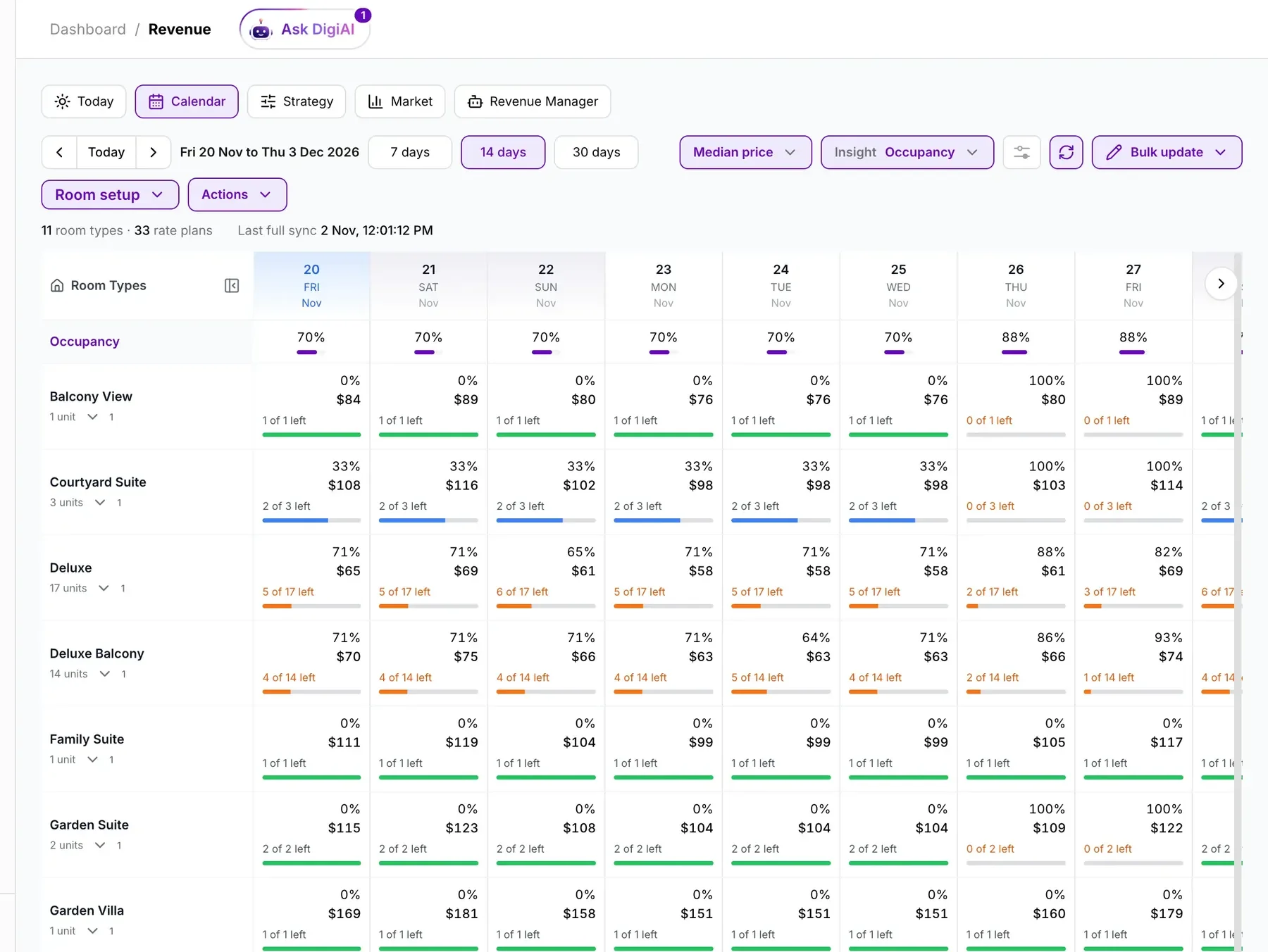
Rates and rooms on one calendar
Every room type for the weeks ahead on one screen, with the price, the rooms left and how full you are. Change a price or the rooms on sale and it goes to every booking site.
- Price, rooms left and occupancy by date
- One change, every site
Change a month in one go
Pick the dates, the days of the week and the room types, then raise or lower the rate by an amount or a percentage. Check the new prices, then send them everywhere.
- Any dates and weekdays
- By amount or percentage
Restrictions for any dates
Set a minimum or maximum stay, close a date to arrivals or departures, or stop selling a room type for a few days. The rule goes to every booking site with the rate.
- Minimum and maximum stay
- Closed to arrival or departure, stop sell
Decide how many rooms each site can sell
Give each booking site its own share of a room type. A site never sells more than its share, or more than you have left, while your website and desk sell the rest.
- A limit per site and room type
- Never more than you have
One sale closes the room everywhere
When the last room of a type sells on any site, it closes on every other site at once. The booking lands in reservations with the guest, dates and amount filled in.
- No double bookings
- Bookings arrive filled in
Linked rate plans
Price breakfast or half board as a percentage above your room-only rate. Change the room-only price and every linked plan follows.
- Plans priced from one rate
- Change one, the rest follow
Sell a villa whole or room by room
Put a villa on sale as one booking or as separate rooms. Book the whole villa and its rooms close. Book one room and the whole villa closes.
- One nightly price for the whole villa
- Availability linked both ways
Know what each booking site costs you
Set the commission each booking site takes and who collects the payment, the site or your desk. Every booking from that site is priced with its commission.
- Commission per site
- Site collects or you collect
Connected to the tools you use.







 2,000+ more







Pairs well with Channel manager.
Questions about Channel manager.
Which booking sites do you connect to?
Booking.com, Expedia, Airbnb, Agoda, MakeMyTrip, Goibibo, Trip.com and many more. See the full list on our integrations page.
Will I get double bookings?
No. When a room sells on any site, on your website or at the desk, it closes everywhere at once.
Do I still log in to each booking site?
Not for rates, rooms or restrictions. You change them once in DigiStay. Photos and descriptions are still edited on each site.
Can I give a booking site fewer rooms than I have?
Yes. Set how many rooms each site can sell for each room type. A site never sells more than that, or more than you have left.
Can you list us on new sites?
Yes. We can list you on new booking sites and optimise your listings.
See channel manager on your own property.
A short call, with your own rooms and rates.